
The full story behind Payso Pro — why it exists, what it does, and who it is for.
The wall
I live in Somalia. A couple of years ago, I decided to build an online store and sell digital products. The plan was simple. The first problem I hit was not.
How do I accept payments?
In most of the world, that question has an easy answer. You sign up for Stripe or PayPal, connect your bank account, and you are done. That path is completely closed to me. Somalia is not a supported country on those platforms. There is no internationally recognised banking infrastructure. No accepted billing address. No way in.
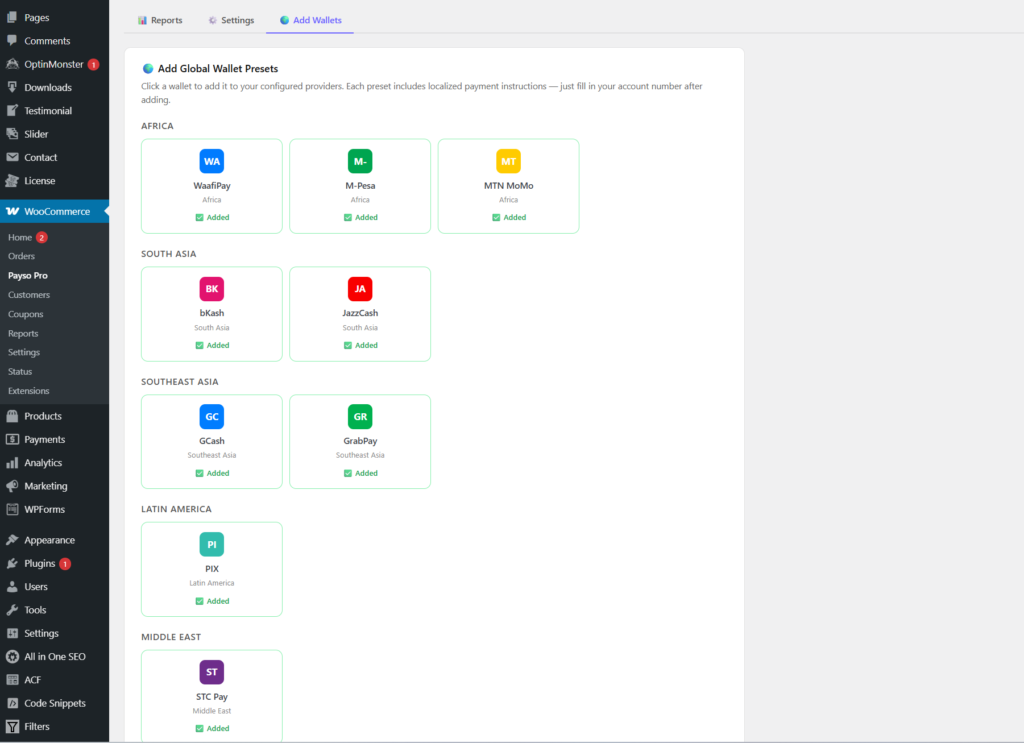
What we do have — what almost every Somali uses every single day — are mobile wallets. Waafi, EVC Plus, ZAAD, SAHAL, DahabPlus, etc. People send money, receive money, and pay for things through these wallets constantly. So I figured the answer was obvious: connect WaafiPay to my WooCommerce store.
I contacted Hormuud Telecom, the company behind Waafi and EVC Plus. I asked about getting API access for my store.
Here is what I found out. To get WaafiPay API credentials — the merchant ID, the API user ID, the API key — you have to go in person to a Hormuud or Waafi HQ offices. There is no online application. You show up, register in person, and then you have to meet their requirements before they approve you. A registered business license. A website with meaningful existing traffic. A transaction history that proves your store is already operating at scale.
I was just starting. I had none of those things. And the honest truth is that most young people trying to launch an online business in Somalia are in exactly the same position. The requirements assume you are already successful. They are not designed for the beginning of the journey.
So I was stuck. My customers could pay with their wallets — they do it every day for everything else in their lives. But I had no proper way to accept those payments on my store.
What I realised
I spent some time with this problem. I read through the WaafiPay API documentation properly to understand exactly what it does. The API sends a payment request directly to the customer’s wallet, the customer enters their PIN, and the payment is confirmed in real time — instant, automatic, no human involvement.
But here is what I also realised. The actual movement of money does not require an API. Anyone can send money to a WaafiPay number. Anyone can scan a QR code and pay. The API exists to automate the confirmation — to tell the merchant’s system instantly that the money arrived and the order should go through.
So the question became: what if I built something that handles the entire checkout and order fulfilment experience, but replaces that automatic confirmation with a process that is fast enough that the difference barely matters?
That is the idea Payso Pro is built on.
The checkout
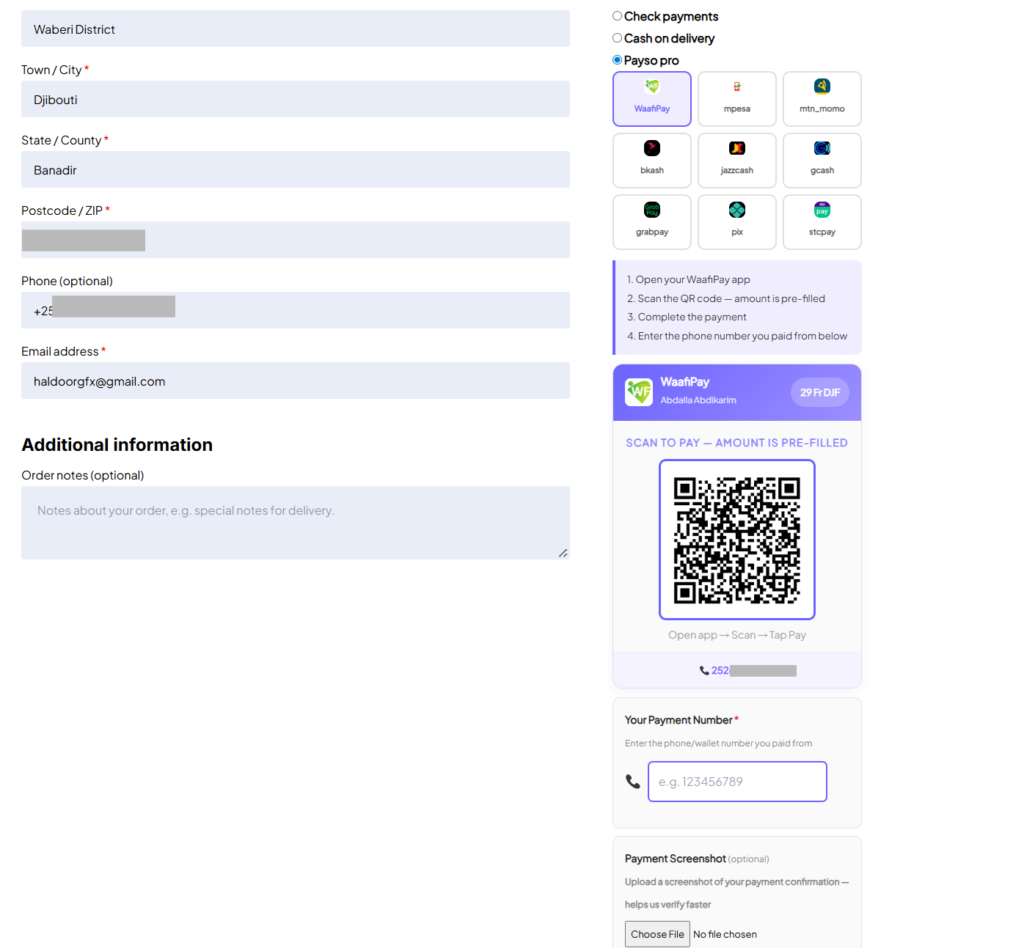
When a customer reaches checkout on a store using Payso Pro, they see the available mobile wallet options — whatever the merchant/shop owner has set up. They select their wallet. They are shown the merchant’s wallet number, a QR code they can scan directly with their wallet app, and clear step-by-step payment instructions written specifically for that wallet.
They open their app, scan the QR code or send to the number, pay the exact amount, and then enter the phone number they paid from. They place the order.
What happens after the order is placed
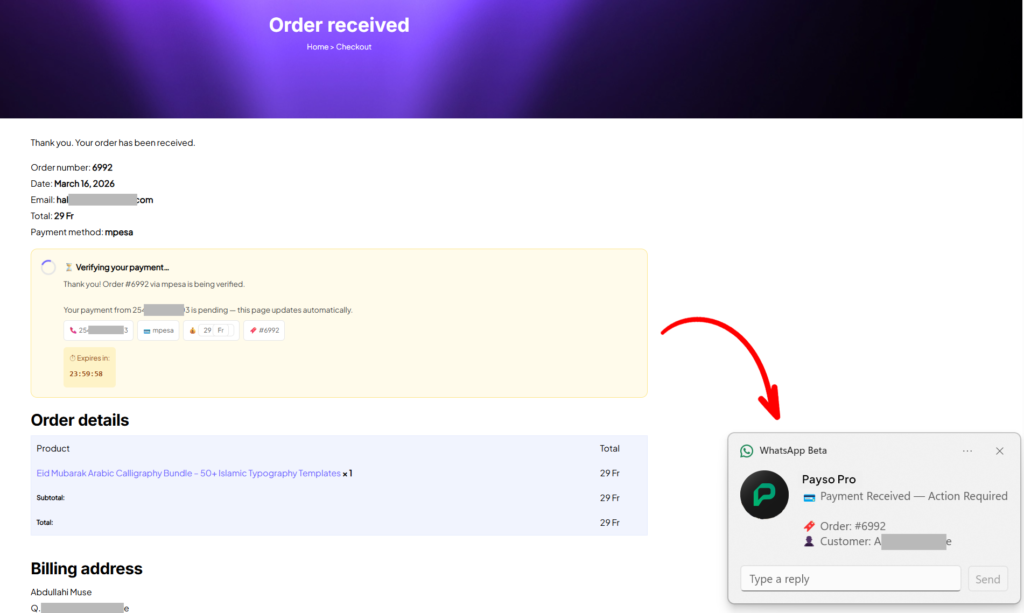
The moment a customer places an order, two things happen at the same time.
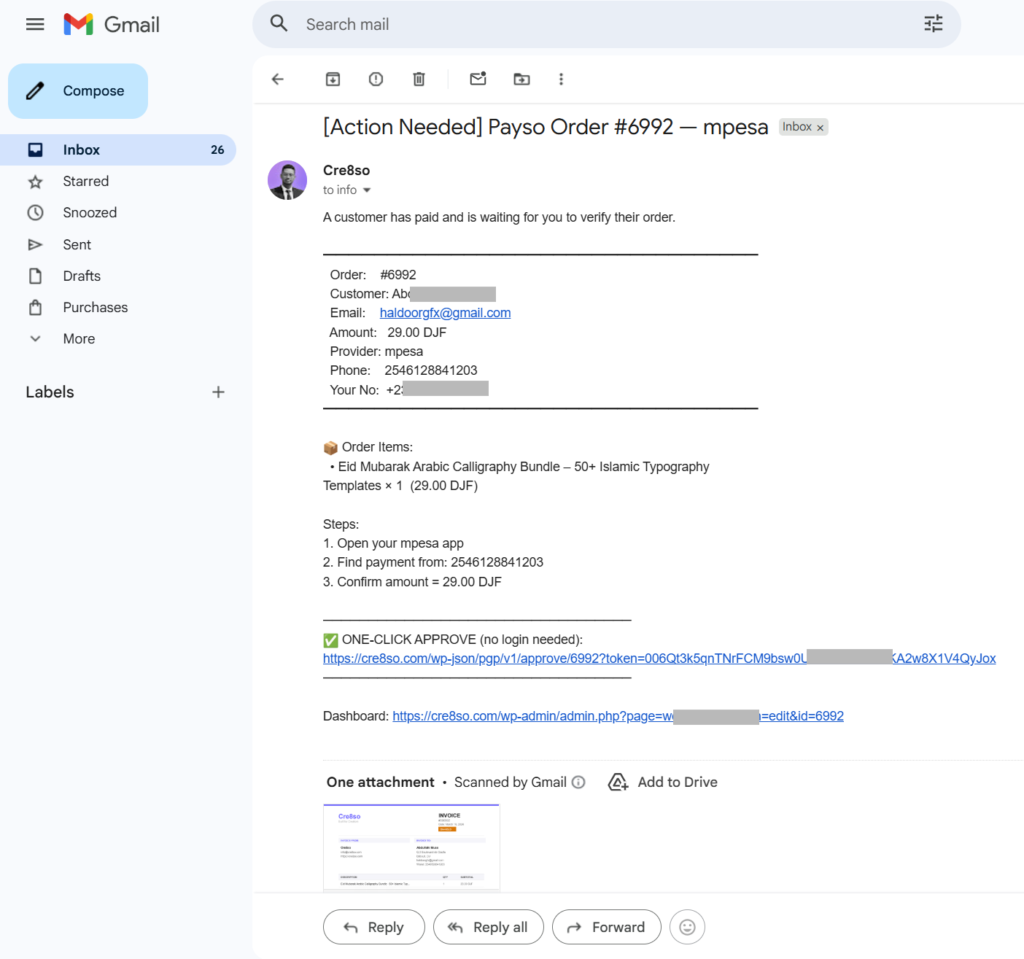
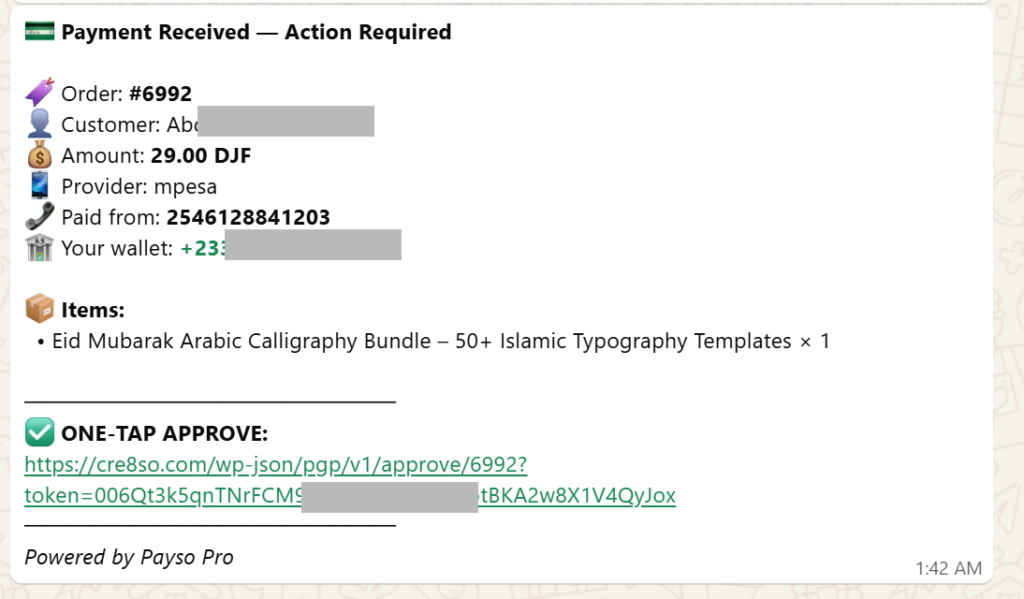
The merchant receives an email with everything they need — customer name, email, order number, the product purchased, the amount, the wallet used, and the phone number the customer says they paid from. That email contains a one-tap approval link.
At the same time, a WhatsApp message arrives on the merchant’s phone with exactly the same information. Because WhatsApp is already open on most people’s phones, this is usually what the shop owner sees first.
The merchant reads the details, opens their wallet app to confirm the payment came through from that number, and taps the approval link in the WhatsApp message. A confirmation page opens showing the full order summary — not just a button to blindly click, but the actual order details so the merchant can verify once more before approving. They tap Approve.
The order is marked complete. The customer receives their product automatically. They have been waiting on the thank you page, which refreshes itself the moment the order is approved.
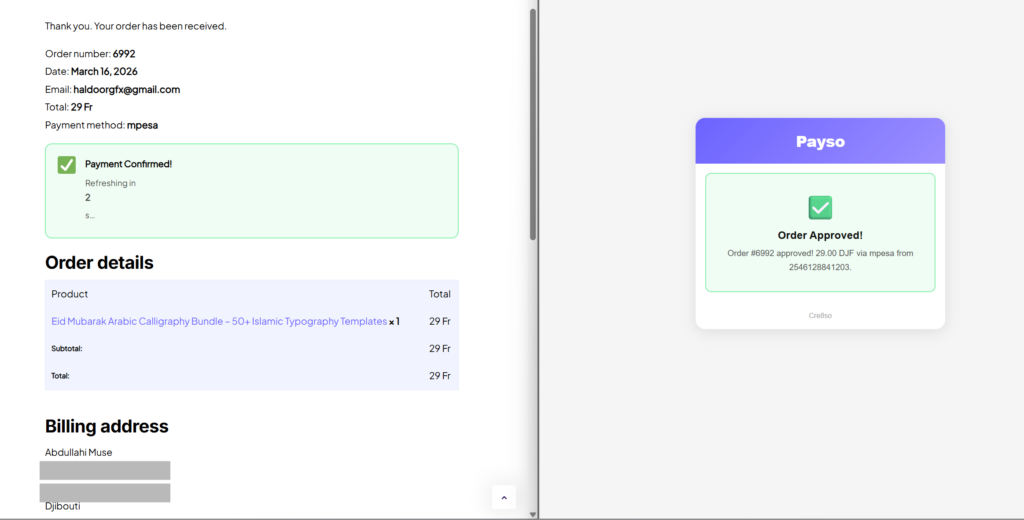
The whole process — from the WhatsApp arriving to the customer getting their product — usually takes under two minutes. The merchant never needs to open the WordPress dashboard or search through any orders.
The AI layer
In the Pro version, there is an additional step that handles a lot of the manual work automatically.
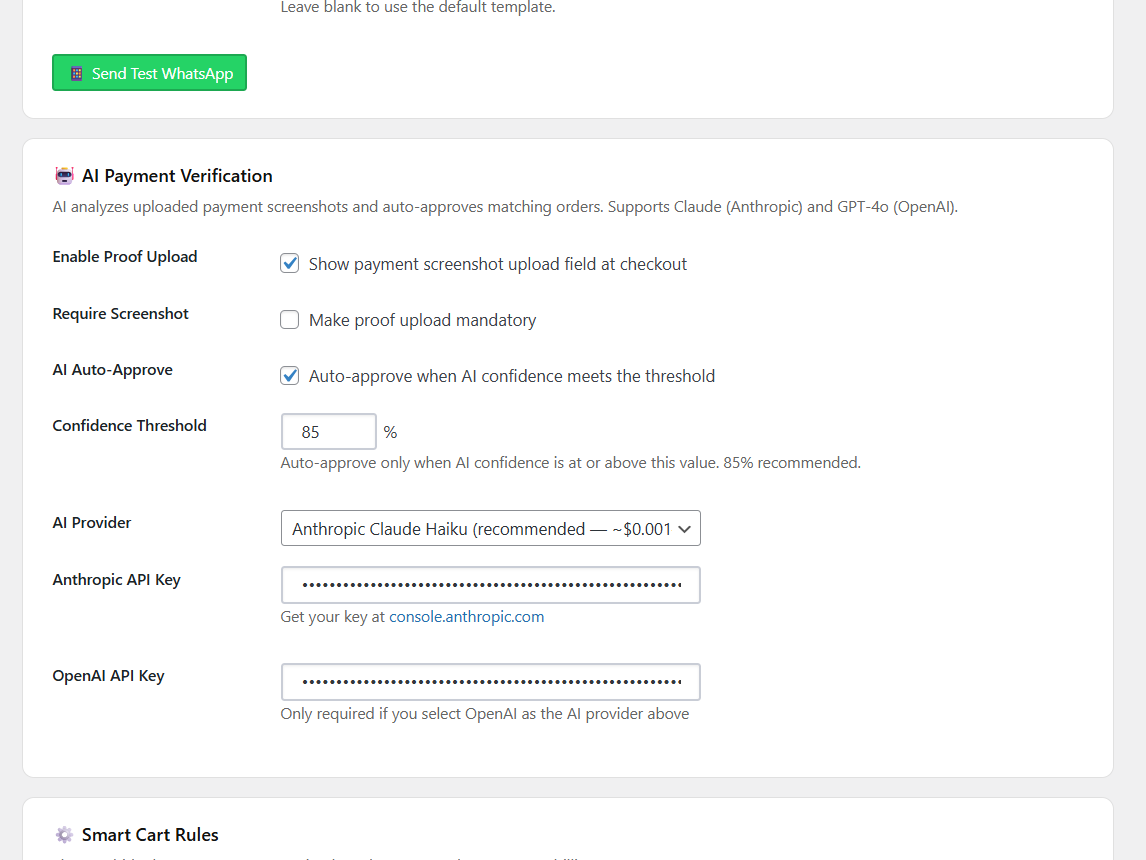
Customers can upload a screenshot of their payment confirmation when they check out — the screen their wallet shows them after they have paid. That screenshot goes to Claude AI, which reads the image and extracts the amount, transaction ID, sender phone number, and date. It then compares those details against the order.
If everything matches and the confidence score meets the threshold the merchant has set, the order is approved automatically. The customer gets their product. The merchant gets a note in the order history explaining exactly what the AI found and at what confidence level it approved.
For orders where the AI is not confident enough — maybe the screenshot is unclear, or the amounts don’t match — the merchant gets the standard WhatsApp notification and approves manually. The screenshot and the AI’s full analysis are shown right there in the order page so the merchant can see everything and make the call.
Everything else worth knowing
Every approved order generates a PDF invoice automatically and attaches it to both the merchant email and the customer confirmation email. No setup required — it just happens on every order.
There is a full approval history on every order. Every action is recorded — who approved it, when, whether it was manual or AI, and whether it was rejected. Merchants can add private notes to any order that the customer never sees.
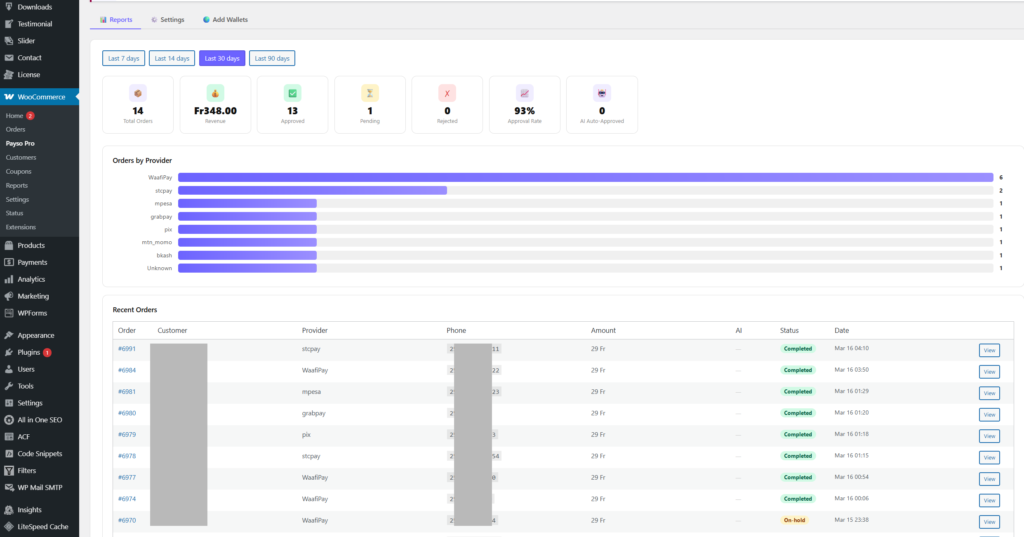
There is a reports dashboard showing revenue, total orders, approval rate, pending and rejected counts, a breakdown of orders by wallet provider, and how many orders the AI handled automatically. Filter by 7, 14, 30, or 90 days.
↳I have attached a screenshot of the reports dashboard.
The WhatsApp notifications support three providers — Twilio, Meta’s Cloud API, and TextMeBot. Some are free, some have a small cost per message. Setup guides for each are built directly into the plugin settings.
Smart cart rules let merchants control when the payment option appears at checkout — by country, by cart amount, or by currency. No code needed.
For merchants running online courses with Tutor LMS, LearnDash, or LifterLMS — student enrollment fires after manual approval, not when the order is placed. This had to be specifically built because most payment plugins get it wrong and enroll students before payment is actually confirmed.
What this is not
I want to be straightforward about this.
Payso Pro is not a full API integration with WaafiPay. When WaafiPay’s API confirms a payment, it happens instantly with no human involvement at all. Payso Pro requires the merchant to verify and approve the payment manually — which takes a minute or two. That is the trade-off.
If you can get WaafiPay API access, the official integration is the better choice for high-volume operations. Payso Pro is for everyone who cannot get that access yet, or who wants to start accepting payments today without waiting months for approval that may or may not come.
This is still being built
Payso Pro works and handles real orders every day. But I want to be honest — there are things still in progress.
Automatic plugin updates from the WordPress dashboard are not live yet. For now, you update by downloading the new version manually. I am also working on expanding the wallet presets, improving how the AI handles edge cases, and adding more detailed customer-facing notifications.
If you run into something that does not work the way it should, or something is missing that would genuinely make a difference to your workflow — please tell me. That is how this gets better.
Who this is for
If you run a WooCommerce store and your customers pay with mobile wallets — WaafiPay, EVC Plus, DahabPlus, M-Pesa, MTN MoMo, or any other local wallet — and you are currently losing sales or managing payments with no real system, this was built for you.
You do not need API access. You do not need a business license. You do not need existing traffic or a transaction history to get started.
You need a wallet number, a WooCommerce store, and about fifteen minutes.
The free version is on WordPress.org — search for Payso for WooCommerce. It gives you the core checkout flow, QR code display, admin email notifications, and one-tap approval.
The Pro version adds WhatsApp notifications, AI payment verification, PDF invoices, approval history, reports dashboard, and smart cart rules.
If you want to test it, have questions about whether it fits your setup, or just want to talk through how it works — reach out. I am happy to help personally.
— Abdalla Abdikarim
haldoorgfx / Cre8so
hello@haldoorgfx.com
@haldoorgfx across all platforms
Latest Product